Aesthetic desk accessories: choose a few things that work together
Build a desk setup around useful accessories, a consistent material palette and one personal detail. Includes a practical checklist for a retro desk clock.
Choose a palette from the desk you already own
Aesthetic desk accessories are most convincing when they look like they belong to the same workspace. That does not mean buying an entire matching set. Start with the two largest surfaces you already see: the desk itself and the computer or monitor. They give you a useful starting palette.
On a wooden desk with a silver computer, beige, off-white and muted metal can make a restrained combination. A dark desk might work better with a lighter keyboard or one colourful object. Treat these as options to try, not rules. Put a material sample or an item you already own beside the desk before choosing a new colour.
Repeat a colour or material in two places if you want the setup to feel connected. For example, a beige clock and a cream keyboard can relate to each other without making every cable, container and notebook the same colour.
Give each accessory a specific job
A desk mat can define the keyboard and mouse area. Before choosing one, measure the space it will cover and decide whether you also want to write directly on it. A mat that overlaps a notebook or extends over the desk edge creates a new problem.
A tray gives small items a place to return to. Choose its size from the objects you need to store, rather than filling a large tray because it is there. If you frequently move between rooms, a small container that travels with you may be more useful.
A lamp needs to light the area you use without occupying your writing space or reflecting across the display. Try the intended position with your existing light before deciding on a new shape or base size.
A clock makes the time visible without opening another screen. Look at digit size, contrast, viewing angle and brightness controls before choosing its case design. A beautiful object that is hard to read from your chair is not doing its main job.
Use one object to set the tone
A distinctive clock, speaker or small piece of art can carry most of the personality in a desk setup. Give it some space instead of surrounding it with several equally prominent objects. This is especially useful on a narrow desk, where a large collection can crowd the work area.
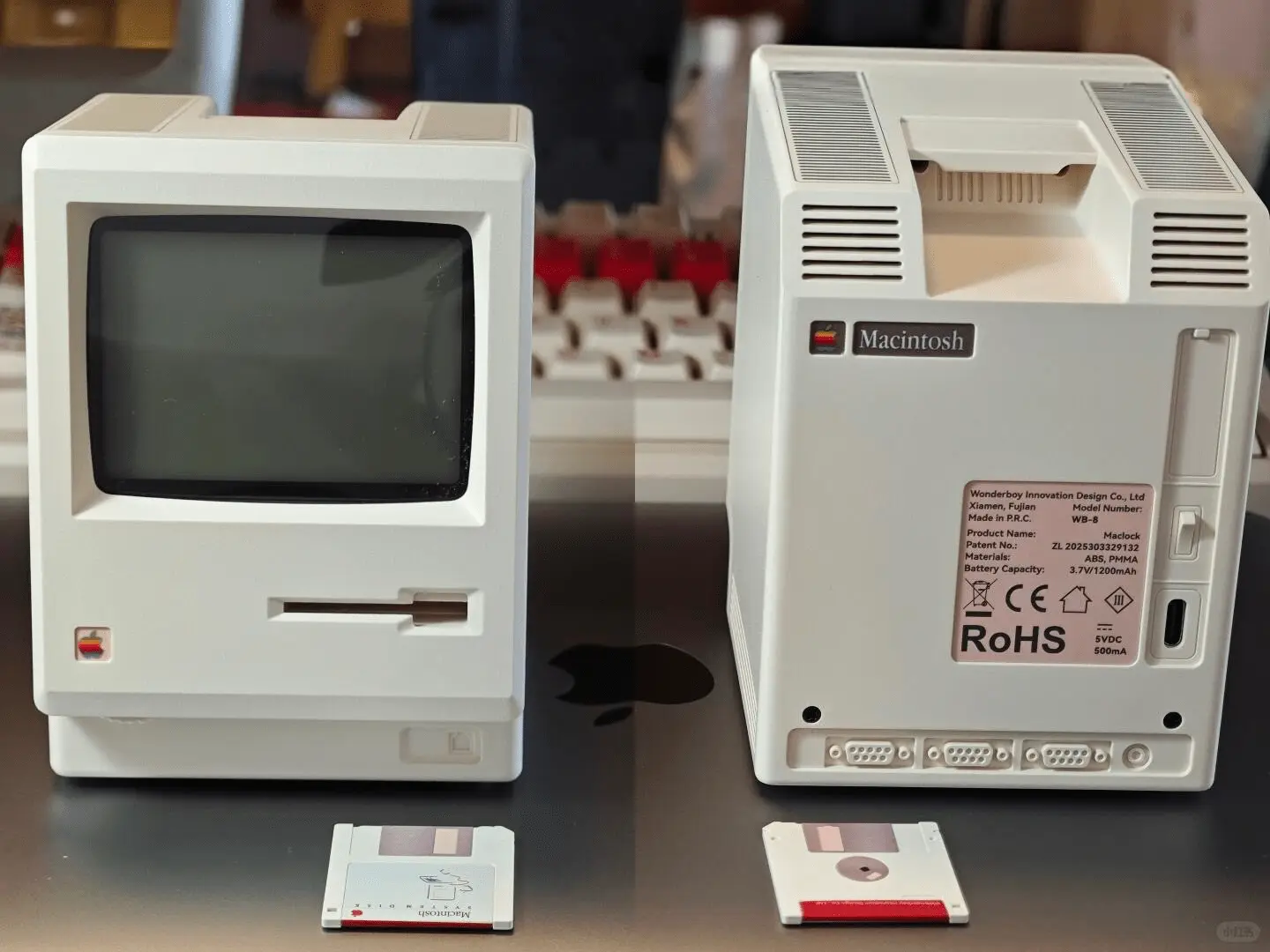
For a retro computing look, Maclock uses a miniature Macintosh-style silhouette, beige case and dot-matrix display. It can sit alongside current equipment without requiring a full-size vintage computer. Its footprint is 80 × 91 mm and its body is 112 mm tall.
The front and rear photographs here show the actual case details. They are useful for judging the shape, but they do not establish scale next to your own monitor. Compare the measurements with a paper cutout on your desk before ordering.
Think about what the desk looks like while you use it
An empty desk photograph does not show a charging laptop, an open notebook or the cables you need during the day. Make those normal conditions part of your plan. Accessories should still make sense when the desk is doing its job.
Check whether an object blocks a port, hides a useful indicator or has to move whenever you open a drawer. Leave controls within reach. If the item needs charging, make room for the connector and decide where the cable will live when it is unplugged.
For a clock, check its appearance in the evening as well as in daylight. A bright display that suits a sunny desk may be distracting in a bedroom. Look for a brightness setting that works in the room where you will actually use it.
A short checklist before you buy
You do not need a completely new setup to make the desk feel more personal. Start with the accessory that solves the most obvious problem, use it for a while, and only then decide what is missing.
- Can you describe the accessory’s daily use in one sentence?
- Have you measured its footprint and any required cable or control clearance?
- Does the colour or material connect to something already on the desk?
- Will it stay in place when you use your keyboard, mouse and notebook?
- Have you checked the power requirements, delivery information and return terms?
- Would you still like the object without the styling in the product photograph?
If a small Macintosh-style clock fits your plan, explore Maclock’s display, dimensions and real product photos. Go to Maclock →